New in CoachThem: Station Tags Are Here
Station-based practices are one of the best ways to maximize reps, keep kids engaged, and give coaches more teaching moments in less time. To support that style of coaching, CoachThem just launched Station Tags that help you organize your library and repeat station setups that actually work.
What’s new (and what changed)
You can now tag your drills and station layouts with:
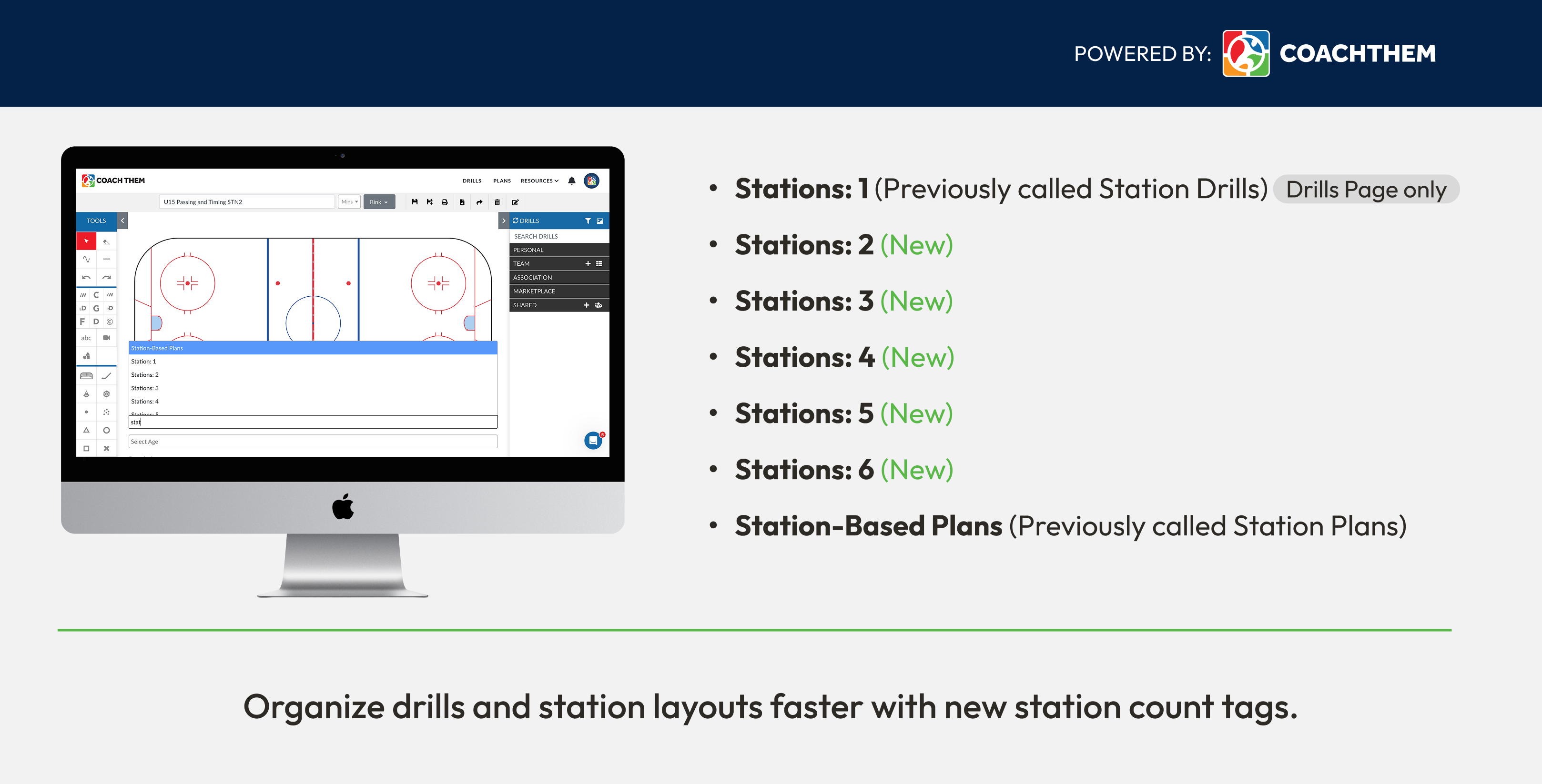
These tags live right under the Sketchpad, so you can add them while you are building a drill or station layout.
Quick glossary
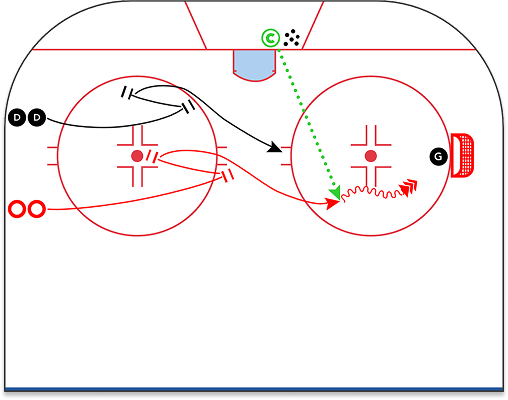
- Station Drill: One drill designed to run as a single station. In CoachThem, tag this Stations: 1.
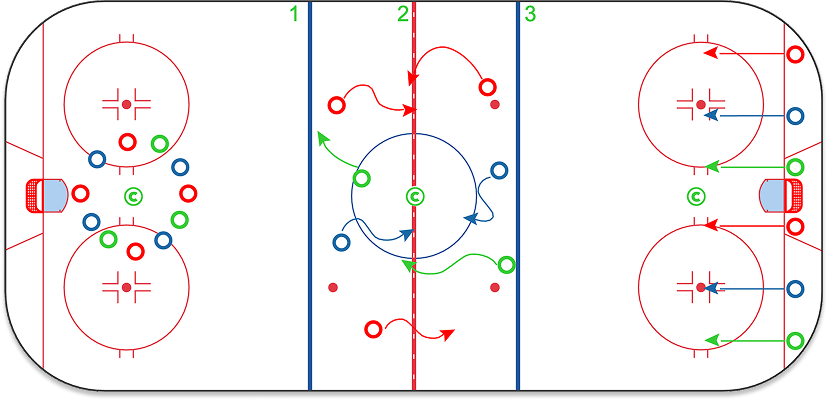
- Station-Based Plan: Multiple station drills combined on one ice surface, running at the same time. Tag this Station-Based Plans plus Stations: 2 to 6.
- Practice Plan: Your full practice. A practice can include one or multiple Station-Based Plans.
Simple hierarchy: Station Drill → Station-Based Plan → Practice Plan
Quick visual examples:
Station Drill (Stations: 1)
Station-Based Plan (Stations: 3)
Why Station Practices Matter in Hockey
Stations are not a new idea, but coaching resources continue to reinforce them because they help players get more reps in less time and keep practices moving.
Station-Based Practices are Backed by Major Hockey Bodies
- USA Hockey (ADM): USA Hockey publishes age-specific practice plans and resources that support station-based practice structure at younger ages. Practice Plans | Repetition & Player Activity | ADM overview
- Hockey Canada: Hockey Canada publishes practice plan PDFs that include dedicated skill station segments within a session. Example practice plan (Skill Stations)
- Swedish Ice Hockey Association (Svenska Ishockeyförbundet): Swedish federation materials include stationsträning (station training) with suggested station setups and timing. Station training examples (PDF)
The point is simple: when stations are organized well, players spend more time doing, less time waiting.
Why Being Specific Matters: Stations: 2 is not the same as Stations: 5
A practice labeled “stations” can mean a lot of different setups. The number of stations changes everything:
- Group sizes and rep volume
- Coach coverage and teaching quality
- Equipment needs
- Rotation time and transitions
- Pace and intensity
That is why the Stations: 1 through Stations: 6 tags exist. They help you stay honest about the setup that actually worked, so you can repeat it later without rebuilding from scratch.
How Station Tags organize your library in CoachThem
These tags are not just labels. Each tag you apply creates its own folder, which means your library organizes itself as you save content.
- Tag a drill Stations: 2 and CoachThem will create a Stations: 2 folder under your Personal folder.
- Tag a drill Stations: 4 and it will appear in the Stations: 4 folder.
- Tag a station layout Station-Based Plans and it will appear in the Station-Based Plans folder.
This keeps your saved library organized automatically, and makes it easier to build a station-based library over time.
Best practices for tagging (so your library stays clean)
1) On the Drills page: Tagging an individual Station Drill (single station)
Use these tags when you are creating and saving a single drill:
- Stations: 1 for a true single-station drill (one station, one drill). This tag is drills only.
- Optional: add Stations: 2 to Stations: 6 if that drill is commonly used inside a specific station format (example: a drill you usually run inside a Stations: 4 rotation).
Do not forget to tag the skills. The more accurately you tag your drills (skating, puck control, passing, shooting, checking, and more), the easier it is to find that perfect drill later.
2) On the Drills page: Creating and tagging a Station-Based Plan (multi-station setup)
A Station-Based Plan is your full station layout on one ice surface. It includes multiple drills running at the same time, usually 2 to 6 stations.
The easy way to build a Station-Based Plan
- Open the station drills you want to use in separate browser tabs.
- Copy each drill from the other tab and paste it into the same ice surface layout.
- Arrange them into stations (2 through 6).
- Save that full layout as your Station-Based Plan.
- Tag it properly so it is easy to reuse later.
Copy and paste shortcut reference (Mac and Windows)
- Mac: Copy = Command (⌘) + C, Paste = Command (⌘) + V, switch tabs = Command (⌘) + Tab
- Windows: Copy = Ctrl + C, Paste = Ctrl + V, switch tabs = Alt + Tab
- Tip: You can also right-click and choose Copy or Paste if you prefer.
Tags to use on a Station-Based Plan
- Station-Based Plans
- Stations: 2 to Stations: 6 to match how many stations are running at the same time
This is what makes your station setups repeatable. If you build a great Stations: 3 layout, you can reuse it all season and keep it neatly organized in your library.
3) On the Plans page: Building and tagging your full Practice Plan
Your Practice Plan is where you pull everything together.
- Add one or more Station-Based Plans into the practice, depending on the day’s structure, your staff, and your time.
- Tag the practice with the station count you ran most of the day (example: Stations: 3) and your skill focus tags so you can find it fast later.
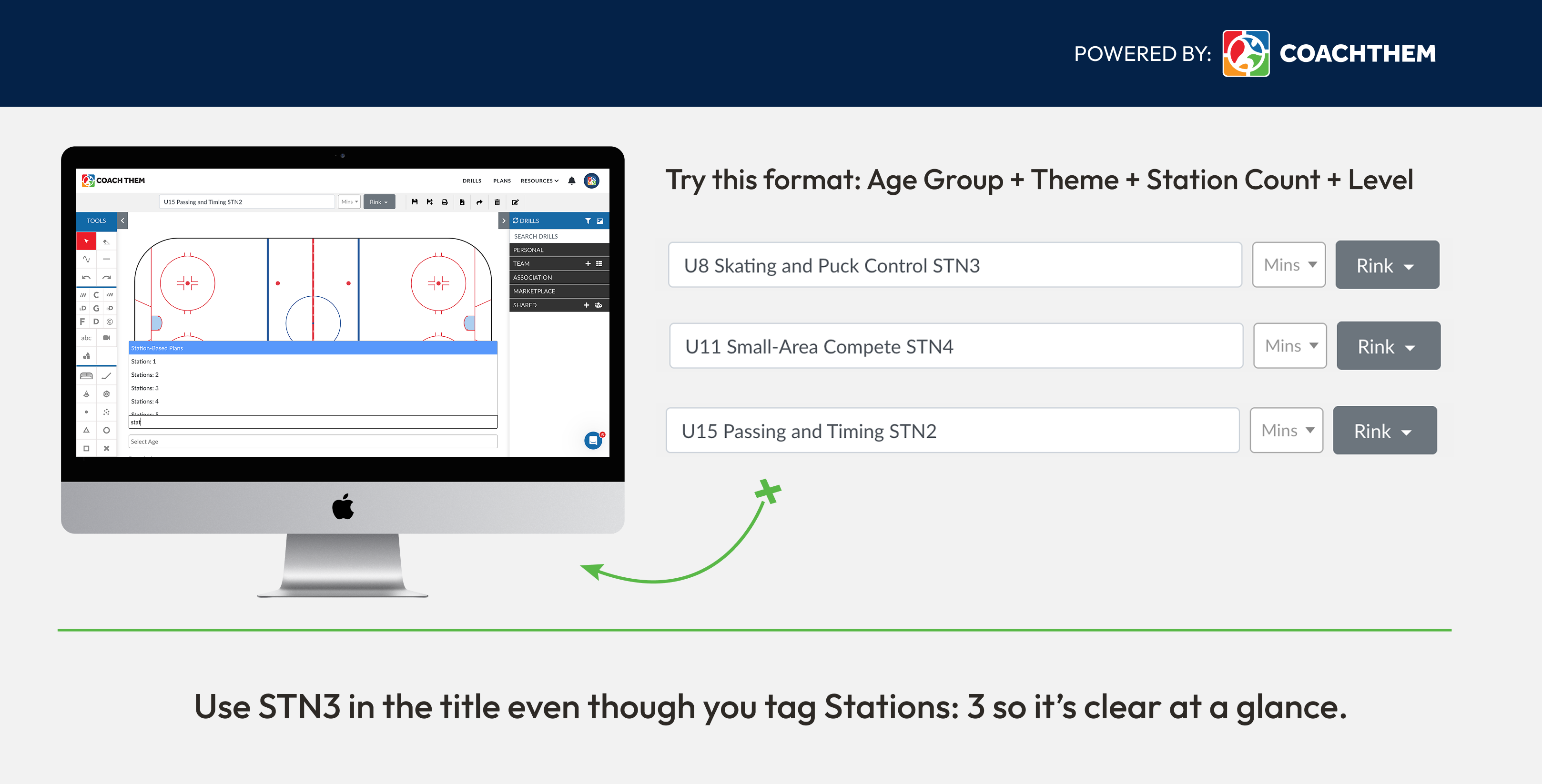
Naming conventions that keep your station library organized
A consistent naming format keeps everything clean, especially as your library grows.
Why coaches will feel the difference
If you run stations regularly, you already know the challenge is not coming up with drills. It is staying organized and repeating what works. Station Tags help you:
- Build a clean station library over time
- Keep your Personal folders structured by real ice setup
- Save planning time because your content is already filed correctly
- Stay consistent when you have a different number of coaches on a given night
Start Using Station Tags Today
Next time you create a drill or station layout in CoachThem, add the Station Tags before you save. Your folders will take care of the rest. If you are a coach who runs station-based practices, this update is going to make your library feel cleaner immediately.
Frequently Asked Questions (FAQ)
Q: What are Station Tags in CoachThem?
A: Station Tags are a way to label drills and station layouts in CoachThem based on how many stations they are designed for. Tags include Stations: 1–6 and Station-Based Plans, helping coaches organize station-based practices more accurately.
Q: Where do Station Tags appear when I use them?
A: Station Tags appear directly under the Sketchpad while you are building a drill or station layout. When you apply a tag, CoachThem files that content into the matching folder in your Personal library.
Q: What is the difference between Stations: 1 and Station-Based Plans?
A: Stations: 1 is for a single station drill. Station-Based Plans are full multi-station layouts built on one ice surface.
Q: Why does the number of stations matter in practice planning?
A: The number of stations affects group size, rep volume, coaching coverage, equipment needs, and overall pace. A practice with two stations runs very differently from one with five or six, which is why CoachThem lets coaches tag drills and station layouts by exact station count.

January 8, 2026
Written by the CoachThem
Ditch the pen and paper! Sign up or log in to create professional digital drills in minutes.
Join CoachThem Rewards to earn money by referring other coaches and growing our coaching community!